HCP Terraform and Terraform Enterprise: New Features for Cost Management and Governance
HashiCorp's latest Terraform updates introduce cost analytics, project-level state sharing, credential testing, notifications, and registry tagging for better governance.
In recent months, HashiCorp has rolled out significant enhancements to both HCP Terraform and Terraform Enterprise, aimed at giving organizations greater control over infrastructure costs, security, and operational efficiency. These updates include general availability of billable resource analytics, project-level remote state sharing, module testing for dynamic credentials, and project-level notifications, along with a beta release for registry tagging. Below, we break down each feature in a Q&A format to help you understand the impact on your infrastructure lifecycle.
What are the key new features in HCP Terraform and Terraform Enterprise?
The latest updates include billable resource analytics (GA), project-level remote state sharing (GA), module testing for dynamic credentials (GA), project-level notifications (GA), and registry tagging (Beta). Billable resource analytics provides granular cost visibility by breaking down consumption at the project and workspace level. Project-level remote state sharing allows platform teams to securely share state data across projects without compromising governance. Module testing for dynamic credentials enhances security validation. Project-level notifications streamline alerting for specific teams. Registry tagging, still in beta, simplifies module discovery through custom tags. Together, these features eliminate infrastructure blind spots and strengthen governance across the entire lifecycle.
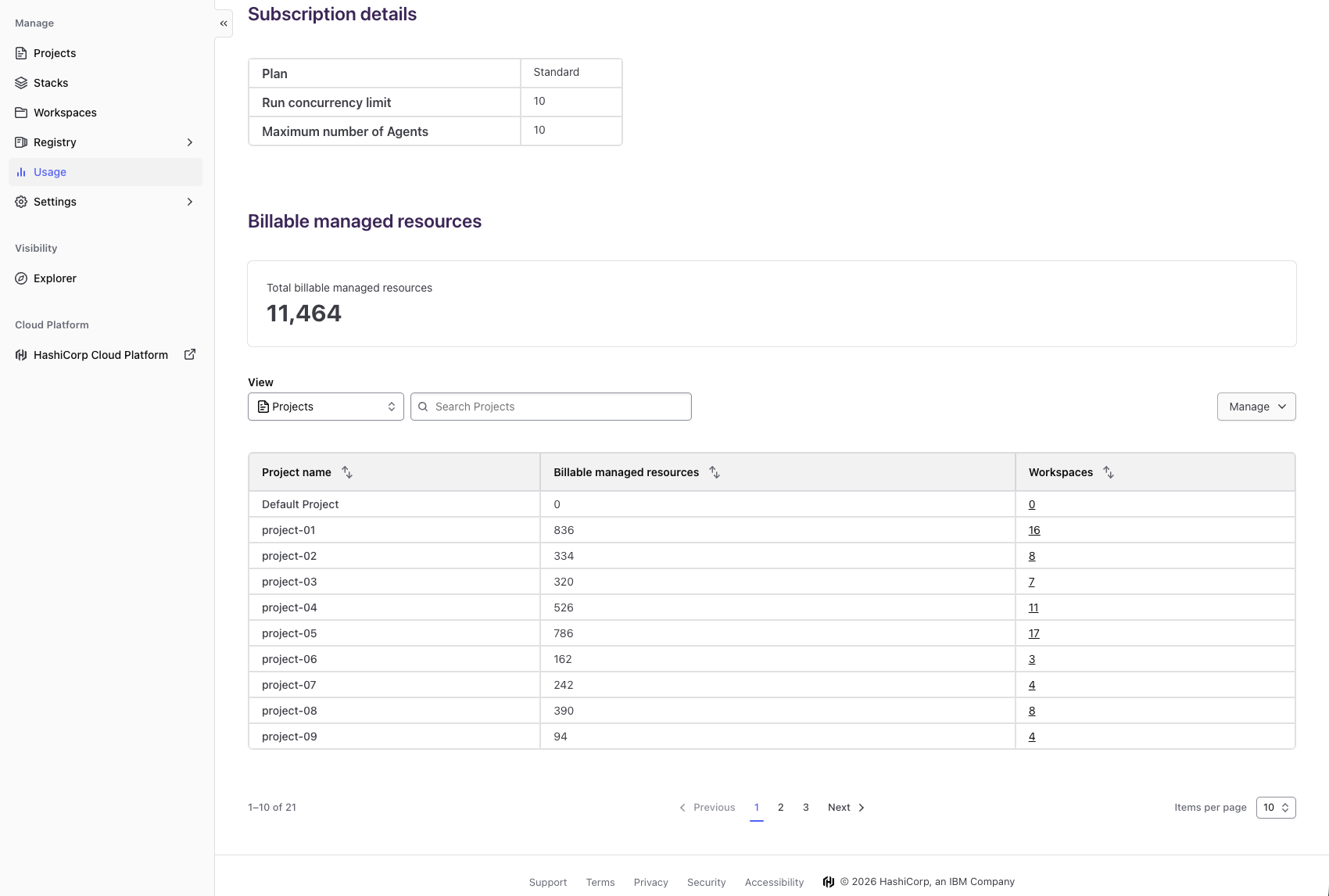
How does billable resource analytics help organizations manage costs?
Previously, HCP Terraform users on resources under management (RUM)-based billing could only see total billable managed resources at the organization level—an opaque view that made cost estimation and optimization nearly impossible. With the general availability of billable resource analytics, organizations now gain detailed breakdowns by project and workspace. Decision makers can instantly identify high-consumption areas, right-size resources, and predict future spending. This self-service view on the existing usage page eliminates delays in accessing critical cost data. For example, if a single workspace consumes 40% of your monthly allocation, you can investigate and adjust configurations. The result: proactive cost management instead of reacting to surprise bills, plus data-driven resource allocation that aligns spending with business priorities.
What benefits does project-level remote state sharing provide?
Platform teams managing large-scale infrastructure often need to share state data—like output values or resource references—across workspaces. Previously, sharing meant either exposing data at the organization level (too broad) or duplicating outputs manually (inefficient). The new project-level remote state sharing, now generally available, lets teams control data access at the project scope. This means you can securely share state outputs with workspaces in the same project without granting cross-organization visibility. Benefits include reduced duplication, more precise governance because sharing rules align with your team structures, and simplified workflows for multi-workspace dependencies. Platform engineers can finally eliminate the trade-off between security and collaboration.
What is new with module testing for dynamic credentials?
When using dynamic credentials—such as short-lived tokens from Vault or AWS STS—validating that modules correctly handle credential rotation and permissions is critical. The latest update brings general availability of module testing for dynamic credentials. This feature enables automated tests that verify module behavior against actual credential lifecycle events, not just static configurations. Teams can now simulate credential refresh intervals, test failure scenarios, and ensure modules degrade gracefully. For security-conscious organizations, this means higher confidence that infrastructure changes won't accidentally expose secrets or break access. The feature integrates with existing Terraform test frameworks, making it easy to add without overhauling your CI/CD pipeline.
How do project-level notifications improve governance?
Before this release, notification settings were limited to the organization level, meaning every critical change or failure sent alerts to the same group—often overwhelming teams with irrelevant information. Project-level notifications, now GA, let you configure granular alerts per project. For instance, you can set the networking project to notify only the network team when a run fails, while the database project alerts the DBA team. This reduces noise and speeds up incident response. Additionally, you can define different notification channels (e.g., Slack, email) per project. The result: targeted governance that respects team boundaries and ensures the right people are informed at the right time.
What is registry tagging and how does it help?
As organizations accumulate hundreds of modules in their private registry, finding the right one becomes a challenge. Registry tagging, currently in beta, addresses this by allowing users to assign custom tags like "networking," "production-ready," or "compliance-approved" to modules. These tags make search and filtering much more intuitive compared to relying solely on module names and descriptions. For platform teams, tagging enables better module governance—for example, enforcing that only modules tagged "audited" can be used in production workspaces. While still in beta, this feature promises to dramatically improve discoverability and reduce duplication as your registry grows.
How can organizations get started with these new features?
To take advantage of billable resource analytics, any user on a paid HCP Terraform plan can access the new view on the existing usage page for their organization. There's no additional configuration needed—just navigate to the usage page to see the breakdown by project and workspace. For project-level remote state sharing and notifications, enable the feature in your project settings. Module testing for dynamic credentials requires updating your Terraform test files; see the official documentation for examples. Registry tagging can be accessed through the private registry UI in beta. All features are available today for HCP Terraform and Terraform Enterprise users with appropriate licenses.